COLMAP in practice
Published:
An aside from the main series, in two halves. The first explains what Structure-from-Motion and COLMAP are, assuming nothing; the second is the practical detail, for anyone who has to actually run the thing. If you only want the idea, stop after the four steps. The promised post on measuring without scale is still coming.
Start with a square full of tourists
Picture a statue in a city square on a busy afternoon. Two hundred people photograph it — from the steps, from the café terrace, close up, from across the road. Nobody coordinates with anybody. Afterwards, every one of those photographs ends up in a single folder.
Now sit down and look through them. Nobody has told you anything about who stood where, and yet you can work a surprising amount out. This one was taken from the left. This one from higher up, probably from the steps. These two were taken almost from the same spot. You know it because you keep recognising the same details — a chip in the stone, a lamp post, the pattern of the paving — turning up in different places in different photographs.
Structure-from-Motion is a computer doing exactly that, automatically and far more precisely than you can. Give it the folder and it recovers two things at the same time:
- where every photograph was taken from, and
- the three-dimensional shape of the thing everyone was pointing at.
The name is a description of the method: it recovers structure — the shape — from motion, the camera moving between one shot and the next. The earlier post explains why this works at all; the short version is that it is the same trick your two eyes play on you every second of the day.
Now swap the statue for a tomato plant, and the two hundred tourists for one person walking a slow circle around it with a phone. That is my working day, and the problem is identical.
COLMAP is the program that does it
COLMAP is the open-source software package that performs Structure-from-Motion, released alongside a 2016 paper by Johannes Schönberger and Jan-Michael Frahm. It has been the default choice for about a decade. It is not the only option, but it is the one that everything else quietly assumes you used.
It is not a single button. It is a handful of command-line steps that you run in order, each writing its results into a shared database file for the next step to pick up.
It matters for this blog because every 3D Gaussian Splatting pipeline I know of begins here. The point cloud that the splatting post treated as its raw material is, in practice, COLMAP output. So are the camera positions — and those matter just as much, because the splat optimiser has to know where a photograph was taken from before it can compare its own render against it.
The four steps, in plain words
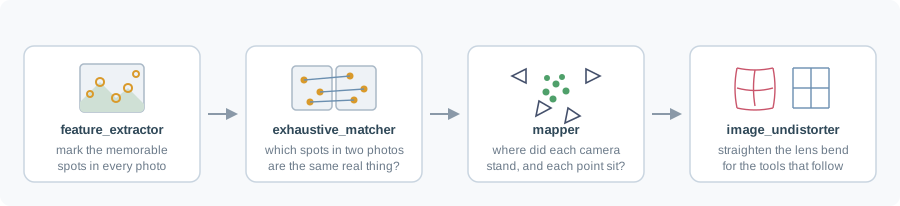
- Find the memorable spots. Go through each photograph on its own and mark the places distinctive enough to be recognised again — a corner, a speckle, a chip in the stone. Smooth, blank regions get nothing.
- Match them up. Take photographs two at a time and decide which marked spots in one are the same physical thing as which marked spots in the other.
- Solve. Given thousands of these correspondences, work out the only arrangement of cameras and 3D points that explains them all.
- Tidy up. Rewrite the photographs to remove the lens’s bending of straight lines, so the tools downstream can assume a simple, idealised camera.
Stripped of the bookkeeping, that is these four commands:
colmap feature_extractor \
    --database_path  colmap/database.db \
    --image_path     colmap/images \
    --ImageReader.single_camera 1 \
    --FeatureExtraction.use_gpu 1

colmap exhaustive_matcher \
    --database_path  colmap/database.db \
    --FeatureMatching.use_gpu 1

colmap mapper \
    --database_path  colmap/database.db \
    --image_path     colmap/images \
    --output_path    colmap/sparse \
    --Mapper.max_num_models=1 \
    --Mapper.init_min_tri_angle=4 \
    --Mapper.filter_min_tri_angle=0.5

colmap image_undistorter \
    --image_path     colmap/images \
    --input_path     colmap/sparse/0 \
    --output_path    colmap/undistorted
The rest of this post is about the flags, because that is where the interesting decisions live.
single_camera — tell it what you know
Back to the square for a moment. Two hundred tourists means two hundred different cameras and phones, each with its own lens, and part of the puzzle is working out what each lens does to the picture. But if you took all two hundred photographs yourself, on one phone, then there is only one lens to figure out — and saying so out loud saves an enormous amount of guessing.
That is this flag. --ImageReader.single_camera 1 declares that every image came from the same physical camera with the same settings, so they share one set of intrinsics: focal length, principal point, and lens distortion.
If your frames were extracted from a single video, this is simply true, and asserting it is close to free accuracy. Instead of solving for those parameters once per image, the solver estimates one set constrained by every image at once. Fewer unknowns, better conditioned, less drift.
The corollary: if you did change lenses or zoom mid-session, this flag is a lie and it will quietly bend your reconstruction. It is worth being sure.
Matching — the step that costs
Imagine being handed the two hundred photographs and asked to find every pair that shows the same corner of the square. Nobody labelled them. The only way to be certain is to hold up each photograph against every other one — and that is a lot of holding up.
This is why matching, not feature extraction, is where the time goes. Finding the memorable spots in one photograph is quick and can be done for all of them at once. Working out which photographs overlap has no cheap answer.
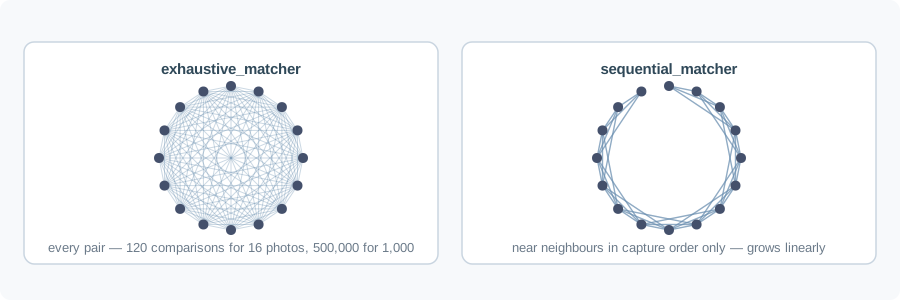
exhaustive_matcher tries every pair. For N images that is N(N−1)/2 comparisons — fine at 200 images, unpleasant at 1,000, hopeless at 5,000. It is also the safest option, because it cannot miss an overlap.
sequential_matcher assumes your images arrive in capture order, which they do if you extracted them from a video, and only matches each frame against a window of its neighbours:
colmap sequential_matcher \
    --database_path colmap/database.db \
    --SequentialMatching.overlap 30 \
    --FeatureMatching.use_gpu 1
I switch between the two on frame count — exhaustive under a few hundred, sequential above. The thing to know about sequential matching is that it only sees time-adjacent pairs, so when you walk a full circle around a plant, the last frame and the first frame overlap in space but are far apart in the sequence. That loop never closes, and the reconstruction can drift all the way round without anything pulling it shut. COLMAP has vocabulary-tree loop detection to fix exactly this; if you go sequential on a walkaround, turn it on.
The mapper, and triangulation angle
The mapper is the actual Structure-from-Motion solver. It chooses a good initial image pair, triangulates points between them, then registers the remaining images one at a time, re-running bundle adjustment periodically to keep everything consistent.
Two of my flags are about triangulation angle. Here is the everyday version. Your two eyes sit about six centimetres apart, and that gap is what lets you judge distance. Now imagine your eyes were only two millimetres apart. They would still both see the room perfectly well — but the two views would be so nearly identical that you would have almost no sense of what was near and what was far.
The angle between two viewpoints, measured at the object they are both looking at, is the triangulation angle, and it is exactly this: a small angle means a weak opinion about depth.
--Mapper.init_min_tri_angle=4 therefore requires at least four degrees between the two cameras of the initial pair — the pair COLMAP builds everything else on top of. Two nearly identical viewpoints can match beautifully and still say almost nothing about depth: the rays are close to parallel, so a small error in the image sends their intersection sliding a long way. Starting from that is how you get a reconstruction that looks plausible and is wrong.
--Mapper.filter_min_tri_angle=0.5 is the same idea applied afterwards, discarding points whose observations are too close to parallel to be trusted.
--Mapper.max_num_models=1 is a different kind of choice. Think of a jigsaw where two clusters of pieces each fit together nicely, but nothing joins the two clusters — you finish with two islands and no way to know how they sit relative to each other. Given photographs it cannot link into one consistent scene, COLMAP will happily hand you exactly that: two or three separate models. That is COLMAP being honest — the connections were not there — but for my purposes a fragmented capture is a failed capture, and I would rather find that out immediately than discover it later in a splat that covers half a plant.
Where it fails on plants
The general advice above applies to any scene. Plants add their own problems, and all of them trace back to a single assumption: Structure-from-Motion assumes the scene is rigid and static.
The statue in the square is an ideal subject precisely because it does not move. Now imagine the tourists photographing something less cooperative — a busy market stall, where between one photograph and the next the crates have been restacked and half the produce has been sold. Recognising “the same thing” in two photographs stops meaning what it did, and the whole method begins to fight itself.
A plant is a mild version of that market stall.
Foliage moves. A greenhouse has ventilation fans, air currents, and leaves light enough to respond to both. Between two frames a few seconds apart, the leaf has changed shape. That feature match is now geometrically inconsistent with every static point in the scene, and it enters the solve as an outlier. RANSAC absorbs some of this. Enough of it and registration simply fails. The practical answer is unglamorous: capture faster, and capture when the fans are off.
Leaves are poor features. A green surface with a smooth gradient and few distinctive marks yields few keypoints. What COLMAP latches onto instead is soil texture, pot rims, plant labels, bench edges, and greenhouse clutter. This is usually enough to solve the camera poses — which is what you actually need — but the sparse cloud is often much thinner on the plant than beginners expect. Sparse points on the crop are not necessarily a failure.
Greenhouses repeat themselves. Identical pots, identical trays, evenly spaced benches, a repeating structural frame. Repetitive structure is the classic way to get confident false matches, and confident false matches produce reconstructions that are locally clean and globally folded.
Glass and sky. Backlighting through greenhouse glazing blows out leaf detail and drives auto-exposure to swing between frames. Specular highlights move with the camera, which means they are features that violate the static-scene assumption by construction.
Reading the result
Before spending GPU hours on splatting, check three things.
First, how many images registered. The mapper reports this. If you gave it 600 frames and it registered 340, you do not have the capture you think you have, and the missing 260 are usually contiguous — that is where something went wrong in the room.
Second, how many models came out. More than one means the scene did not connect.
Third, look at the sparse cloud. Not as a formality: open it and see whether the shape is the plant. A folded or doubled reconstruction is obvious in three seconds of viewing and invisible in the log.
Two operational notes
Build matters. The COLMAP in your distribution’s package manager may be compiled without CUDA, and the GPU flags above then do nothing or fail outright. I keep a CUDA-enabled build separate from the system one for this reason.
And on a headless machine, COLMAP will try to create an OpenGL context and crash. export QT_QPA_PLATFORM=offscreen fixes it. This cost me an afternoon once, and the error message points nowhere useful.
What you have at the end
Camera poses for every registered image, a sparse point cloud, and undistorted images — everything a splat optimiser needs to begin.
What you do not have is any idea how large the plant is. COLMAP is scrupulous about geometry and silent about scale, for the reason the earlier post gave: nothing in the process ever compared a photograph to a ruler.
Back to the main series next: measuring a plant’s traits without ever fixing the scale.